Epstein Files Full PDF

CLICK HERE
Technopedia Center
PMB University Brochure
Faculty of Engineering and Computer Science
S1 Informatics S1 Information Systems S1 Information Technology S1 Computer Engineering S1 Electrical Engineering S1 Civil Engineering

faculty of Economics and Business
S1 Management S1 Accountancy

Faculty of Letters and Educational Sciences
S1 English literature S1 English language education S1 Mathematics education S1 Sports Education
teknopedia

  • Registerasi
  • Brosur UTI
  • Kip Scholarship Information
  • Performance
Flag Counter
  1. World Encyclopedia
  2. 2D computer graphics - Wikipedia
2D computer graphics - Wikipedia
From Wikipedia, the free encyclopedia
Computer-based generation of digital images
This article has multiple issues. Please help improve it or discuss these issues on the talk page. (Learn how and when to remove these messages)
icon
This article needs additional citations for verification. Please help improve this article by adding citations to reliable sources. Unsourced material may be challenged and removed.
Find sources: "2D computer graphics" – news · newspapers · books · scholar · JSTOR
(December 2009) (Learn how and when to remove this message)
This article may contain original research. Please improve it by verifying the claims made and adding inline citations. Statements consisting only of original research should be removed. (July 2019) (Learn how and when to remove this message)
(Learn how and when to remove this message)

2D computer graphics is the computer-based generation of digital images—mostly from two-dimensional models (such as 2D geometric models, text, and digital images) and by techniques specific to them. It may refer to the branch of computer science that comprises such techniques or to the models themselves.

Raster graphic sprites (left) and masks

2D computer graphics are mainly used in applications that were originally developed upon traditional printing and drawing technologies, such as typography, cartography, technical drawing, advertising, etc. In those applications, the two-dimensional image is not just a representation of a real-world object, but an independent artifact with added semantic value; two-dimensional models are therefore preferred, because they give more direct control of the image than 3D computer graphics (whose approach is more akin to photography than to typography).

In many domains, such as desktop publishing, engineering, and business, a description of a document based on 2D computer graphics techniques can be much smaller than the corresponding digital image—often by a factor of 1/1000 or more. This representation is also more flexible since it can be rendered at different resolutions to suit different output devices. For these reasons, documents and illustrations are often stored or transmitted as 2D graphic files.

2D computer graphics started in the 1950s, based on vector graphics devices. These were largely supplanted by raster-based devices in the following decades. The PostScript language and the X Window System protocol were landmark developments in the field.

2D graphics models may combine geometric models (also called vector graphics), digital images (also called raster graphics), text to be typeset (defined by content, font style and size, color, position, and orientation), mathematical functions and equations, and more. These components can be modified and manipulated by two-dimensional geometric transformations such as translation, rotation, and scaling. In object-oriented graphics, the image is described indirectly by an object endowed with a self-rendering method—a procedure that assigns colors to the image pixels by an arbitrary algorithm. Complex models can be built by combining simpler objects, in the paradigms of object-oriented programming.

Background (geometry)

[edit]
icon
This section duplicates the scope of other articles, specifically Translation (geometry) and Rotation (geometry). Please discuss this issue and help introduce a summary style to the section by replacing the section with a link and a summary or by splitting the content into a new article. (May 2022)
Further information: Rotations and reflections in two dimensions
A translation moves every point of a figure or a space by the same amount in a given direction.

In Euclidean geometry, a translation (geometry) moves every point a constant distance in a specified direction. A translation can be described as a rigid motion: other rigid motions include rotations and reflections. A translation can also be interpreted as the addition of a constant vector to every point, or as shifting the origin of the coordinate system. A translation operator is an operator T δ {\displaystyle T_{\mathbf {\delta } }} {\displaystyle T_{\mathbf {\delta } }} such that T δ f ( v ) = f ( v + δ ) . {\displaystyle T_{\mathbf {\delta } }f(\mathbf {v} )=f(\mathbf {v} +\mathbf {\delta } ).} {\displaystyle T_{\mathbf {\delta } }f(\mathbf {v} )=f(\mathbf {v} +\mathbf {\delta } ).}

If v is a fixed vector, then the translation Tv will work as Tv(p) = p + v.

If T is a translation, then the image of a subset A under the function T is the translation of A by T. The translation of A by Tv is often written A + v.

In a Euclidean space, any translation is an isometry. The set of all translations forms the translation group T, which is isomorphic to the space itself, and a normal subgroup of Euclidean group E(n ). The quotient group of E(n ) by T is isomorphic to the orthogonal group O(n ):

E(n ) / T ≅ O(n ).

Translation

[edit]

Since a translation is an affine transformation but not a linear transformation, homogeneous coordinates are normally used to represent the translation operator by a matrix and thus to make it linear. Thus we write the 3-dimensional vector w = (wx, wy, wz) using 4 homogeneous coordinates as w = (wx, wy, wz, 1).[1]

To translate an object by a vector v, each homogeneous vector p (written in homogeneous coordinates) would need to be multiplied by this translation matrix:
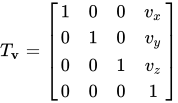
T v = [ 1 0 0 v x 0 1 0 v y 0 0 1 v z 0 0 0 1 ] {\displaystyle T_{\mathbf {v} }={\begin{bmatrix}1&0&0&v_{x}\\0&1&0&v_{y}\\0&0&1&v_{z}\\0&0&0&1\end{bmatrix}}} {\displaystyle T_{\mathbf {v} }={\begin{bmatrix}1&0&0&v_{x}\\0&1&0&v_{y}\\0&0&1&v_{z}\\0&0&0&1\end{bmatrix}}}

As shown below, the multiplication will give the expected result:
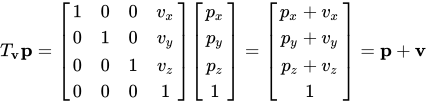
T v p = [ 1 0 0 v x 0 1 0 v y 0 0 1 v z 0 0 0 1 ] [ p x p y p z 1 ] = [ p x + v x p y + v y p z + v z 1 ] = p + v {\displaystyle T_{\mathbf {v} }\mathbf {p} ={\begin{bmatrix}1&0&0&v_{x}\\0&1&0&v_{y}\\0&0&1&v_{z}\\0&0&0&1\end{bmatrix}}{\begin{bmatrix}p_{x}\\p_{y}\\p_{z}\\1\end{bmatrix}}={\begin{bmatrix}p_{x}+v_{x}\\p_{y}+v_{y}\\p_{z}+v_{z}\\1\end{bmatrix}}=\mathbf {p} +\mathbf {v} } {\displaystyle T_{\mathbf {v} }\mathbf {p} ={\begin{bmatrix}1&0&0&v_{x}\\0&1&0&v_{y}\\0&0&1&v_{z}\\0&0&0&1\end{bmatrix}}{\begin{bmatrix}p_{x}\\p_{y}\\p_{z}\\1\end{bmatrix}}={\begin{bmatrix}p_{x}+v_{x}\\p_{y}+v_{y}\\p_{z}+v_{z}\\1\end{bmatrix}}=\mathbf {p} +\mathbf {v} }

The inverse of a translation matrix can be obtained by reversing the direction of the vector:

T v − 1 = T − v . {\displaystyle T_{\mathbf {v} }^{-1}=T_{-\mathbf {v} }.\!} {\displaystyle T_{\mathbf {v} }^{-1}=T_{-\mathbf {v} }.\!}

Similarly, the product of translation matrices is given by adding the vectors:

T u T v = T u + v . {\displaystyle T_{\mathbf {u} }T_{\mathbf {v} }=T_{\mathbf {u} +\mathbf {v} }.\!} {\displaystyle T_{\mathbf {u} }T_{\mathbf {v} }=T_{\mathbf {u} +\mathbf {v} }.\!}

Because addition of vectors is commutative, multiplication of translation matrices is therefore also commutative (unlike multiplication of arbitrary matrices).

Rotation

[edit]

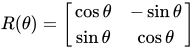
In linear algebra, a rotation matrix is a matrix that is used to perform a rotation in Euclidean space.
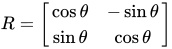
R = [ cos ⁡ θ − sin ⁡ θ sin ⁡ θ cos ⁡ θ ] {\displaystyle R={\begin{bmatrix}\cos \theta &-\sin \theta \\\sin \theta &\cos \theta \\\end{bmatrix}}} {\displaystyle R={\begin{bmatrix}\cos \theta &-\sin \theta \\\sin \theta &\cos \theta \\\end{bmatrix}}}

rotates points in the xy-Cartesian plane counterclockwise through an angle θ about the origin of the Cartesian coordinate system. To perform the rotation using a rotation matrix R, the position of each point must be represented by a column vector v, containing the coordinates of the point. A rotated vector is obtained by using the matrix multiplication Rv. Since matrix multiplication has no effect on the zero vector (i.e., on the coordinates of the origin), rotation matrices can only be used to describe rotations about the origin of the coordinate system.

Rotation matrices provide a simple algebraic description of such rotations, and are used extensively for computations in geometry, physics, and computer graphics. In 2-dimensional space, a rotation can be simply described by an angle θ of rotation, but it can be also represented by the 4 entries of a rotation matrix with 2 rows and 2 columns. In 3-dimensional space, every rotation can be interpreted as a rotation by a given angle about a single fixed axis of rotation (see Euler's rotation theorem), and hence it can be simply described by an angle and a vector with 3 entries. However, it can also be represented by the 9 entries of a rotation matrix with 3 rows and 3 columns. The notion of rotation is not commonly used in dimensions higher than 3; there is a notion of a rotational displacement, which can be represented by a matrix, but no associated single axis or angle.

Rotation matrices are square matrices, with real entries. More specifically they can be characterized as orthogonal matrices with determinant 1:

R T = R − 1 , det R = 1 {\displaystyle R^{T}=R^{-1},\det R=1\,} {\displaystyle R^{T}=R^{-1},\det R=1\,}.

The set of all such matrices of size n forms a group, known as the special orthogonal group SO(n).

In two dimensions

[edit]
A counterclockwise rotation of a vector through angle θ. The vector is initially aligned with the x-axis.

In two dimensions every rotation matrix has the following form:

R ( θ ) = [ cos ⁡ θ − sin ⁡ θ sin ⁡ θ cos ⁡ θ ] {\displaystyle R(\theta )={\begin{bmatrix}\cos \theta &-\sin \theta \\\sin \theta &\cos \theta \\\end{bmatrix}}} {\displaystyle R(\theta )={\begin{bmatrix}\cos \theta &-\sin \theta \\\sin \theta &\cos \theta \\\end{bmatrix}}}.

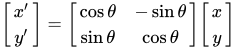
This rotates column vectors by means of the following matrix multiplication:

[ x ′ y ′ ] = [ cos ⁡ θ − sin ⁡ θ sin ⁡ θ cos ⁡ θ ] [ x y ] {\displaystyle {\begin{bmatrix}x'\\y'\\\end{bmatrix}}={\begin{bmatrix}\cos \theta &-\sin \theta \\\sin \theta &\cos \theta \\\end{bmatrix}}{\begin{bmatrix}x\\y\\\end{bmatrix}}} {\displaystyle {\begin{bmatrix}x'\\y'\\\end{bmatrix}}={\begin{bmatrix}\cos \theta &-\sin \theta \\\sin \theta &\cos \theta \\\end{bmatrix}}{\begin{bmatrix}x\\y\\\end{bmatrix}}}.

So the coordinates (x',y') of the point (x,y) after rotation are:

x ′ = x cos ⁡ θ − y sin ⁡ θ {\displaystyle x'=x\cos \theta -y\sin \theta \,} {\displaystyle x'=x\cos \theta -y\sin \theta \,},
y ′ = x sin ⁡ θ + y cos ⁡ θ {\displaystyle y'=x\sin \theta +y\cos \theta \,} {\displaystyle y'=x\sin \theta +y\cos \theta \,}.

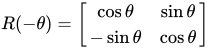
The direction of vector rotation is counterclockwise if θ is positive (e.g. 90°), and clockwise if θ is negative (e.g. -90°).

R ( − θ ) = [ cos ⁡ θ sin ⁡ θ − sin ⁡ θ cos ⁡ θ ] {\displaystyle R(-\theta )={\begin{bmatrix}\cos \theta &\sin \theta \\-\sin \theta &\cos \theta \\\end{bmatrix}}\,} {\displaystyle R(-\theta )={\begin{bmatrix}\cos \theta &\sin \theta \\-\sin \theta &\cos \theta \\\end{bmatrix}}\,}.

Non-standard orientation of the coordinate system

[edit]
A rotation through angle θ with non-standard axes

If a standard right-handed Cartesian coordinate system is used, with the x axis to the right and the y axis up, the rotation R(θ) is counterclockwise. If a left-handed Cartesian coordinate system is used, with x directed to the right but y directed down, R(θ) is clockwise. Such non-standard orientations are rarely used in mathematics but are common in 2D computer graphics, which often have the origin in the top left corner and the y-axis down the screen or page.[2]

See below for other alternative conventions which may change the sense of the rotation produced by a rotation matrix.

Common rotations

[edit]

Particularly useful are the matrices for 90° and 180° rotations:

R ( 90 ∘ ) = [ 0 − 1 1 0 ] {\displaystyle R(90^{\circ })={\begin{bmatrix}0&-1\\[3pt]1&0\\\end{bmatrix}}} {\displaystyle R(90^{\circ })={\begin{bmatrix}0&-1\\[3pt]1&0\\\end{bmatrix}}} (90° counterclockwise rotation)
R ( 180 ∘ ) = [ − 1 0 0 − 1 ] {\displaystyle R(180^{\circ })={\begin{bmatrix}-1&0\\[3pt]0&-1\\\end{bmatrix}}} {\displaystyle R(180^{\circ })={\begin{bmatrix}-1&0\\[3pt]0&-1\\\end{bmatrix}}} (180° rotation in either direction – a half-turn)
R ( 270 ∘ ) = [ 0 1 − 1 0 ] {\displaystyle R(270^{\circ })={\begin{bmatrix}0&1\\[3pt]-1&0\\\end{bmatrix}}} {\displaystyle R(270^{\circ })={\begin{bmatrix}0&1\\[3pt]-1&0\\\end{bmatrix}}} (270° counterclockwise rotation, the same as a 90° clockwise rotation)

Scaling

[edit]
icon
This article needs additional citations for verification. Please help improve this article by adding citations to reliable sources. Unsourced material may be challenged and removed.
Find sources: "2D computer graphics" – news · newspapers · books · scholar · JSTOR
(April 2008) (Learn how and when to remove this message)

In Euclidean geometry, uniform scaling (isotropic scaling,[3] homogeneous dilation, homothety) is a linear transformation that enlarges (increases) or shrinks (diminishes) objects by a scale factor that is the same in all directions. The result of uniform scaling is similar (in the geometric sense) to the original. A scale factor of 1 is normally allowed, so that congruent shapes are also classed as similar. (Some school text books specifically exclude this possibility, just as some exclude squares from being rectangles or circles from being ellipses.)

More general is scaling with a separate scale factor for each axis direction. Non-uniform scaling (anisotropic scaling, inhomogeneous dilation) is obtained when at least one of the scaling factors is different from the others; a special case is directional scaling or stretching (in one direction). Non-uniform scaling changes the shape of the object; e.g. a square may change into a rectangle, or into a parallelogram if the sides of the square are not parallel to the scaling axes (the angles between lines parallel to the axes are preserved, but not all angles).

A scaling can be represented by a scaling matrix. To scale an object by a vector v = (vx, vy, vz), each point p = (px, py, pz) would need to be multiplied with this scaling matrix:
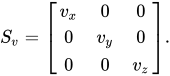
S v = [ v x 0 0 0 v y 0 0 0 v z ] . {\displaystyle S_{v}={\begin{bmatrix}v_{x}&0&0\\0&v_{y}&0\\0&0&v_{z}\\\end{bmatrix}}.} {\displaystyle S_{v}={\begin{bmatrix}v_{x}&0&0\\0&v_{y}&0\\0&0&v_{z}\\\end{bmatrix}}.}

As shown below, the multiplication will give the expected result:
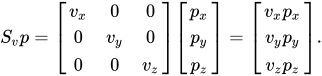
S v p = [ v x 0 0 0 v y 0 0 0 v z ] [ p x p y p z ] = [ v x p x v y p y v z p z ] . {\displaystyle S_{v}p={\begin{bmatrix}v_{x}&0&0\\0&v_{y}&0\\0&0&v_{z}\\\end{bmatrix}}{\begin{bmatrix}p_{x}\\p_{y}\\p_{z}\end{bmatrix}}={\begin{bmatrix}v_{x}p_{x}\\v_{y}p_{y}\\v_{z}p_{z}\end{bmatrix}}.} {\displaystyle S_{v}p={\begin{bmatrix}v_{x}&0&0\\0&v_{y}&0\\0&0&v_{z}\\\end{bmatrix}}{\begin{bmatrix}p_{x}\\p_{y}\\p_{z}\end{bmatrix}}={\begin{bmatrix}v_{x}p_{x}\\v_{y}p_{y}\\v_{z}p_{z}\end{bmatrix}}.}

Such a scaling changes the diameter of an object by a factor between the scale factors, the area by a factor between the smallest and the largest product of two scale factors, and the volume by the product of all three.

The scaling is uniform if and only if the scaling factors are equal (vx = vy = vz). If all except one of the scale factors are equal to 1, we have directional scaling.

In the case where vx = vy = vz = k, the scaling is also called an enlargement or dilation by a factor k, increasing the area by a factor of k2 and the volume by a factor of k3.

Scaling in the most general sense is any affine transformation with a diagonalizable matrix. It includes the case that the three directions of scaling are not perpendicular. It includes also the case that one or more scale factors are equal to zero (projection), and the case of one or more negative scale factors. The latter corresponds to a combination of scaling proper and a kind of reflection: along lines in a particular direction we take the reflection in the point of intersection with a plane that need not be perpendicular; therefore it is more general than ordinary reflection in the plane.

Using homogeneous coordinates

[edit]

In projective geometry, often used in computer graphics, points are represented using homogeneous coordinates. To scale an object by a vector v = (vx, vy, vz), each homogeneous coordinate vector p = (px, py, pz, 1) would need to be multiplied with this projective transformation matrix:
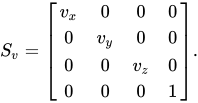
S v = [ v x 0 0 0 0 v y 0 0 0 0 v z 0 0 0 0 1 ] . {\displaystyle S_{v}={\begin{bmatrix}v_{x}&0&0&0\\0&v_{y}&0&0\\0&0&v_{z}&0\\0&0&0&1\end{bmatrix}}.} {\displaystyle S_{v}={\begin{bmatrix}v_{x}&0&0&0\\0&v_{y}&0&0\\0&0&v_{z}&0\\0&0&0&1\end{bmatrix}}.}

As shown below, the multiplication will give the expected result:
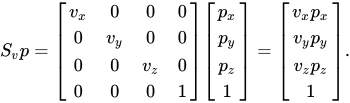
S v p = [ v x 0 0 0 0 v y 0 0 0 0 v z 0 0 0 0 1 ] [ p x p y p z 1 ] = [ v x p x v y p y v z p z 1 ] . {\displaystyle S_{v}p={\begin{bmatrix}v_{x}&0&0&0\\0&v_{y}&0&0\\0&0&v_{z}&0\\0&0&0&1\end{bmatrix}}{\begin{bmatrix}p_{x}\\p_{y}\\p_{z}\\1\end{bmatrix}}={\begin{bmatrix}v_{x}p_{x}\\v_{y}p_{y}\\v_{z}p_{z}\\1\end{bmatrix}}.} {\displaystyle S_{v}p={\begin{bmatrix}v_{x}&0&0&0\\0&v_{y}&0&0\\0&0&v_{z}&0\\0&0&0&1\end{bmatrix}}{\begin{bmatrix}p_{x}\\p_{y}\\p_{z}\\1\end{bmatrix}}={\begin{bmatrix}v_{x}p_{x}\\v_{y}p_{y}\\v_{z}p_{z}\\1\end{bmatrix}}.}

Since the last component of a homogeneous coordinate can be viewed as the denominator of the other three components, a uniform scaling by a common factor s (uniform scaling) can be accomplished by using this scaling matrix:
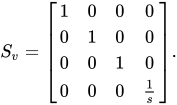
S v = [ 1 0 0 0 0 1 0 0 0 0 1 0 0 0 0 1 s ] . {\displaystyle S_{v}={\begin{bmatrix}1&0&0&0\\0&1&0&0\\0&0&1&0\\0&0&0&{\frac {1}{s}}\end{bmatrix}}.} {\displaystyle S_{v}={\begin{bmatrix}1&0&0&0\\0&1&0&0\\0&0&1&0\\0&0&0&{\frac {1}{s}}\end{bmatrix}}.}

For each vector p = (px, py, pz, 1) we would have
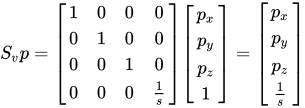
S v p = [ 1 0 0 0 0 1 0 0 0 0 1 0 0 0 0 1 s ] [ p x p y p z 1 ] = [ p x p y p z 1 s ] {\displaystyle S_{v}p={\begin{bmatrix}1&0&0&0\\0&1&0&0\\0&0&1&0\\0&0&0&{\frac {1}{s}}\end{bmatrix}}{\begin{bmatrix}p_{x}\\p_{y}\\p_{z}\\1\end{bmatrix}}={\begin{bmatrix}p_{x}\\p_{y}\\p_{z}\\{\frac {1}{s}}\end{bmatrix}}} {\displaystyle S_{v}p={\begin{bmatrix}1&0&0&0\\0&1&0&0\\0&0&1&0\\0&0&0&{\frac {1}{s}}\end{bmatrix}}{\begin{bmatrix}p_{x}\\p_{y}\\p_{z}\\1\end{bmatrix}}={\begin{bmatrix}p_{x}\\p_{y}\\p_{z}\\{\frac {1}{s}}\end{bmatrix}}}

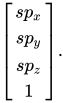
which would be homogenized to

[ s p x s p y s p z 1 ] . {\displaystyle {\begin{bmatrix}sp_{x}\\sp_{y}\\sp_{z}\\1\end{bmatrix}}.} {\displaystyle {\begin{bmatrix}sp_{x}\\sp_{y}\\sp_{z}\\1\end{bmatrix}}.}

Techniques

[edit]

Direct painting

[edit]

A convenient way to create a complex image is to start with a blank "canvas" raster map (an array of pixels, also known as a bitmap) filled with some uniform background color and then "draw", "paint" or "paste" simple patches of color onto it, in an appropriate order. In particular the canvas may be the frame buffer for a computer display.

Some programs will set the pixel colors directly, but most will rely on some 2D graphics library or the machine's graphics card, which usually implement the following operations:

  • paste a given image at a specified offset onto the canvas;
  • write a string of characters with a specified font, at a given position and angle;
  • paint a simple geometric shape, such as a triangle defined by three corners, or a circle with given center and radius;
  • draw a line segment, arc, or simple curve with a virtual pen of given width.

Extended color models

[edit]

Text, shapes and lines are rendered with a client-specified color. Many libraries and cards provide color gradients, which are handy for the generation of smoothly-varying backgrounds, shadow effects, etc. (See also Gouraud shading). The pixel colors can also be taken from a texture, e.g. a digital image (thus emulating rub-on screentones and the fabled checker paint which used to be available only in cartoons).

Painting a pixel with a given color usually replaces its previous color. However, many systems support painting with transparent and translucent colors, which only modify the previous pixel values. The two colors may also be combined in more complex ways, e.g. by computing their bitwise exclusive or. This technique is known as inverting color or color inversion, and is often used in graphical user interfaces for highlighting, rubber-band drawing, and other volatile painting—since re-painting the same shapes with the same color will restore the original pixel values.

Layers

[edit]
A 2D animated character composited with 3D backgrounds using layers
Main article: Layers (digital image editing)

The models used in 2D computer graphics usually do not provide for three-dimensional shapes, or three-dimensional optical phenomena such as lighting, shadows, reflection, refraction, etc. However, they usually can model multiple layers (conceptually of ink, paper, or film; opaque, translucent, or transparent—stacked in a specific order. The ordering is usually defined by a single number (the layer's depth, or distance from the viewer).

Layered models are sometimes called "21⁄2-D computer graphics". They make it possible to mimic traditional drafting and printing techniques based on film and paper, such as cutting and pasting; and allow the user to edit any layer without affecting the others. For these reasons, they are used in most graphics editors. Layered models also allow better spatial anti-aliasing of complex drawings and provide a sound model for certain techniques such as mitered joints and the even–odd rule.

Layered models are also used to allow the user to suppress unwanted information when viewing or printing a document, e.g. roads or railways from a map, certain process layers from an integrated circuit diagram, or hand annotations from a business letter.

In a layer-based model, the target image is produced by "painting" or "pasting" each layer, in order of decreasing depth, on the virtual canvas. Conceptually, each layer is first rendered on its own, yielding a digital image with the desired resolution which is then painted over the canvas, pixel by pixel. Fully transparent parts of a layer need not be rendered, of course. The rendering and painting may be done in parallel, i.e., each layer pixel may be painted on the canvas as soon as it is produced by the rendering procedure.

Layers that consist of complex geometric objects (such as text or polylines) may be broken down into simpler elements (characters or line segments, respectively), which are then painted as separate layers, in some order. However, this solution may create undesirable aliasing artifacts wherever two elements overlap the same pixel.

See also Portable Document Format#Layers.

Hardware

[edit]
See also: Video display controller, List of home computers by video hardware, and Sprite (computer graphics)

Modern computer graphics card displays almost overwhelmingly use raster techniques, dividing the screen into a rectangular grid of pixels, due to the relatively low cost of raster-based video hardware as compared with vector graphic hardware. Most graphic hardware has internal support for blitting operations or sprite drawing. A co-processor dedicated to blitting is known as a Blitter chip.

Classic 2D graphics chips and graphics processing units of the late 1970s to 1980s, used in 8-bit to early 16-bit, arcade games, video game consoles, and home computers, include:

  • Atari, Inc.'s TIA, ANTIC, CTIA and GTIA
  • Capcom's CPS-A and CPS-B
  • Commodore's OCS
  • MOS Technology's VIC and VIC-II
  • Hudson Soft's Cynthia and HuC6270
  • NEC's μPD7220 and μPD72120
  • Ricoh's PPU and S-PPU
  • Sega's VDP, Super Scaler, 315-5011/315-5012 and 315-5196/315-5197
  • Texas Instruments' TMS9918
  • Yamaha's V9938, V9958 and YM7101 VDP

Software

[edit]

Many graphical user interfaces (GUIs), including macOS, Microsoft Windows, or the X Window System, are primarily based on 2D graphical concepts. Such software provides a visual environment for interacting with the computer, and commonly includes some form of window manager to aid the user in conceptually distinguishing between different applications. The user interface within individual software applications is typically 2D in nature as well, due in part to the fact that most common input devices, such as the mouse, are constrained to two dimensions of movement.

2D graphics are very important in the control peripherals such as printers, plotters, sheet cutting machines, etc. They were also used in most early video games; and are still used for card and board games such as solitaire, chess, mahjongg, etc.

2D graphics editors or drawing programs are application-level software for the creation of images, diagrams and illustrations by direct manipulation (through the mouse, graphics tablet, or similar device) of 2D computer graphics primitives. These editors generally provide geometric primitives as well as digital images; and some even support procedural models. The illustration is usually represented internally as a layered model, often with a hierarchical structure to make editing more convenient. These editors generally output graphics files where the layers and primitives are separately preserved in their original form. MacDraw, introduced in 1984 with the Macintosh line of computers, was an early example of this class; recent examples are the commercial products Adobe Illustrator and CorelDRAW, and the free editors such as xfig or Inkscape. There are also many 2D graphics editors specialized for certain types of drawings such as electrical, electronic and VLSI diagrams, topographic maps, computer fonts, etc.

Image editors are specialized for the manipulation of digital images, mainly by means of free-hand drawing/painting and signal processing operations. They typically use a direct-painting paradigm, where the user controls virtual pens, brushes, and other free-hand artistic instruments to apply paint to a virtual canvas. Some image editors support a multiple-layer model; however, in order to support signal-processing operations like blurring each layer is normally represented as a digital image. Therefore, any geometric primitives that are provided by the editor are immediately converted to pixels and painted onto the canvas. The name raster graphics editor is sometimes used to contrast this approach to that of general editors which also handle vector graphics. One of the first popular image editors was Apple's MacPaint, companion to MacDraw. Modern examples are the free GIMP editor, and the commercial products Photoshop and Paint Shop Pro. This class too includes many specialized editors—for medicine, remote sensing, digital photography, etc.

Developmental animation

[edit]

With the resurgence[4]: 8  of 2D animation, free and proprietary software packages have become widely available for amateurs and professional animators. With software like RETAS UbiArt Framework and Adobe After Effects, coloring and compositing can be done in less time.[citation needed]

Various approaches have been developed[4]: 38  to aid and speed up the process of digital 2D animation. For example, by generating vector artwork in a tool like Adobe Flash an artist may employ software-driven automatic coloring and in-betweening.

Programs like Blender or Adobe Substance allow the user to do either 3D animation, 2D animation or combine both in its software allowing experimentation with multiple forms of animation.[5]

See also

[edit]
Wikimedia Commons has media related to 2D.
  • 2.5D
  • 3D computer graphics
  • Computer animation
  • CGI
  • Bit blit
  • Computer graphics
  • Graphic art software
  • Graphics
  • Image scaling
  • List of home computers by video hardware
  • Turtle graphics
  • Transparency in graphics
  • Palette (computing)
  • Parallax scrolling
  • Pixel art
  • List of years in animation

References

[edit]
  1. ^ Richard Paul, 1981, Robot manipulators: mathematics, programming, and control : the computer control of robot manipulators, MIT Press, Cambridge, MA
  2. ^ "Scalable Vector Graphics -- the initial coordinate system", w3.org, 2003
  3. ^ Durand; Cutler. "Transformations" (PowerPoint). Massachusetts Institute of Technology. Retrieved 12 September 2008.
  4. ^ a b Pile, John Jr. (May 2013). 2D Graphics Programming for Games. New York, NY: CRC Press. ISBN 978-1466501898.
  5. ^ "blender.org - Home of the Blender project - Free and Open 3D Creation Software". blender.org. Retrieved 2019-04-24.
  • v
  • t
  • e
Computer graphics
Vector graphics
  • Diffusion curve
  • Pixel
2D graphics
  • Alpha compositing
  • Layers
  • Text-to-image
2.5D
  • Isometric graphics
  • Mode 7
  • Parallax scrolling
  • Ray casting
  • Skybox
3D graphics
  • 3D projection
  • 3D rendering
  • (Image-based
  • Spectral
  • Unbiased)
  • Aliasing
  • Anisotropic filtering
  • Cel shading
  • Fluid animation
  • Lighting
    • Global illumination
  • Hidden-surface determination
  • Polygon mesh
  • (Triangle mesh)
  • Shading
    • Deferred
  • Surface triangulation
  • Wire-frame model
Concepts
  • Affine transformation
  • Back-face culling
  • Clipping
  • Collision detection
  • Planar projection
  • Reflection
  • Rendering
    • Beam tracing
    • Cone tracing
    • Checkerboard rendering
    • Ray tracing
    • Path tracing
    • Ray casting
    • Scanline rendering
  • Rotation
  • Scaling
  • Shadow mapping
  • Shadow volume
  • Shear matrix
  • Shader
  • Texel
  • Translation
  • Volume rendering
  • Voxel
Graphics software
  • 3D computer graphics software
    • animation
    • modeling
    • rendering
  • Raster graphics editors
  • Vector graphics editors
Algorithms
  • List of computer graphics algorithms
  • v
  • t
  • e
Visualization of technical information
Fields
  • Biological data visualization
  • Chemical imaging
  • Crime mapping
  • Data visualization
  • Educational visualization
  • Flow visualization
  • Geovisualization
  • Information visualization
  • Mathematical visualization
  • Medical imaging
  • Molecular graphics
  • Product visualization
  • Scientific visualization
  • Social visualization
  • Software visualization
  • Technical drawing
  • User interface design
  • Visual analytics
  • Visual culture
  • Volume visualization
Image
types
  • Chart
  • Diagram
  • Engineering drawing
  • Graph of a function
  • Ideogram
  • Map
  • Photograph
  • Pictogram
  • Plot
  • Sankey diagram
  • Schematic
  • Skeletal formula
  • Statistical graphics
  • Table
  • Technical drawings
  • Technical illustration
People
Pre-19th century
  • Edmond Halley
  • Charles-René de Fourcroy
  • Joseph Priestley
  • Gaspard Monge
19th century
  • Charles Dupin
  • Adolphe Quetelet
  • André-Michel Guerry
  • William Playfair
  • August Kekulé
  • Charles Joseph Minard
  • Francis Amasa Walker
  • John Venn
  • Oliver Byrne
  • Matthew Sankey
  • Charles Booth
  • John Snow
  • Florence Nightingale
  • Karl Wilhelm Pohlke
  • Toussaint Loua
  • Francis Galton
Early 20th century
  • Edward Walter Maunder
  • Otto Neurath
  • W. E. B. Du Bois
  • Henry Gantt
  • Arthur Lyon Bowley
  • Howard G. Funkhouser
  • John B. Peddle
  • Ejnar Hertzsprung
  • Henry Norris Russell
  • Max O. Lorenz
  • Fritz Kahn
  • Harry Beck
  • Erwin Raisz
Mid 20th century
  • Jacques Bertin
  • Rudolf Modley
  • Arthur H. Robinson
  • John Tukey
  • Mary Eleanor Spear
  • Edgar Anderson
  • Howard T. Fisher
Late 20th century
  • Borden Dent
  • Nigel Holmes
  • William S. Cleveland
  • George G. Robertson
  • Bruce H. McCormick
  • Catherine Plaisant
  • Stuart Card
  • Pat Hanrahan
  • Edward Tufte
  • Ben Shneiderman
  • Michael Friendly
  • Howard Wainer
  • Clifford A. Pickover
  • Lawrence J. Rosenblum
  • Thomas A. DeFanti
  • George Furnas
  • Sheelagh Carpendale
  • Cynthia Brewer
  • Jock D. Mackinlay
  • Alan MacEachren
  • David Goodsell
  • Kwan-Liu Ma
  • Michael Maltz
  • Leland Wilkinson
  • Alfred Inselberg
Early 21st century
  • Ben Fry
  • Jeffrey Heer
  • Jessica Hullman
  • Daniel A. Keim
  • Gordon Kindlmann
  • Aaron Koblin
  • Christopher R. Johnson
  • Manuel Lima
  • David McCandless
  • Mauro Martino
  • John Maeda
  • Miriah Meyer
  • Tamara Munzner
  • Ade Olufeko
  • Hanspeter Pfister
  • Hans Rosling
  • Claudio Silva
  • Moritz Stefaner
  • Fernanda Viégas
  • Martin Wattenberg
  • Bang Wong
  • Hadley Wickham
Related
topics
  • Cartography
  • Chartjunk
  • Color coding
  • Computer graphics
    • in computer science
  • CPK coloring
  • Graph drawing
  • Graphic design
  • Graphic organizer
  • Imaging
  • Information art
  • Information graphics
  • Information science
  • Misleading graph
  • Neuroimaging
  • Patent drawing
  • Scientific modelling
  • Spatial analysis
  • Visual perception
  • Virtual unfolding
  • Volume rendering
  • v
  • t
  • e
Animation topics
By country
  • Azerbaijan
  • Bangladesh
  • Bhutan
  • Brazil
  • Bulgaria
  • Canada
  • China
    • history
  • Czechia
  • Estonia
  • France
  • Hungary
  • India
    • history
  • Indonesia
  • Iran
  • Italy
  • Japan
    • history
  • Korea
    • North
    • South
    • history
  • Latvia
  • Lithuania
  • Malaysia
  • Mexico
  • North Korea
  • Philippines
  • Portugal
  • Romania
  • Russia
  • South Africa
  • Spain
  • Taiwan
  • Thailand
  • Ukraine
  • United Kingdom
  • United States
    • Silent Era
    • The Golden Age
    • World War II
    • Early TV broadcast era
    • Modern TV cable and streaming era
  • Vietnam
    • Timeline in animation
Industry
  • Animator
    • List
  • Animation department
  • Animation director
  • Story artist
  • Animation studios
    • List
  • Animation database
  • Art pipeline
  • Biologist simulators
  • Animation film festivals
    • international
    • regional
  • Highest-grossing films (Opening weekends)
  • Outsourcing
  • International Animation Day
Works
  • Films
    • Computer-animated
    • Feature-length
    • Lost or unfinished
    • Package
    • Short
    • Short series
    • Stop-motion
    • Adult animated films
    • Children's animated films
  • Series
    • Adult animated
    • Children's animated
    • Computer-animated
    • Direct-to-video
    • Flash
    • Internet
    • Television
  • (list of years in animation  · years in animation)
Techniques
Traditional
  • Barrier-grid and stereography
  • Flip book
  • Limited animation
  • Masking
  • Rotoscoping
  • Exposure sheet
Stop motion
  • Claymation
    • clay painting, strata-cut
  • Cutout (silhouette)
  • Graphic
  • Model
    • go motion
  • Object
    • Brickfilm
  • Pixilation
  • Puppetoons
Computer
2D
  • 2.5D
  • Flash
  • PowerPoint
  • SVG
  • CSS
  • Multi-sketch
  • Onion skinning
3D
  • T-pose
  • Cel shading
  • CGI
  • Crowd
  • Facial animation
  • Morph target
  • Motion capture
    • facial
    • hand tracking
    • eye tracking
  • Non-photorealistic rendering
  • Physically based animation
  • Procedural
  • Skeletal
  • Virtual cinematography
Puppetry
  • Traditional puppetry
  • Digital puppetry
    • Machinima
    • Aniforms
    • Virtual human
    • Live2D
  • Supermarionation
Mechanical
  • Animatronics
    • Audio-Animatronics
    • Linear Animation Generator
  • Direct manipulation animation
  • Humanoid animation
  • Idle animation
  • Ink-wash animation
  • Magic Lantern
  • Scanimate
  • Shadowmation
  • Squigglevision
  • Whiteboard animation
Other methods
  • Blocking
  • Character animation
    • model sheet
    • walk cycle
    • lip sync
    • off-model
  • Chuckimation
  • Drawn-on-film
  • Erasure animation
  • Hydrotechnics
  • Inbetweening
  • Morphing
  • Paint-on-glass
  • Pinscreen
  • Pixel art
  • Pose to pose
  • Straight ahead
  • Rubber hose
  • Special effects
  • Sand
  • Syncro-Vox
  • Zoetrope
Variants
  • Abstract animation (visual music)
  • Adult animation
  • Animated cartoon
  • Animated sitcom
  • Animated documentary
  • Educational animation
  • Erotic animation
  • Independent animation
  • Instructional animation
  • Virtual newscaster
History
  • Early history
  • History of computer animation
    • timeline
  • (List of years in animation  ·  : years in animation)
Related topics
  • Animation music
    • Bouncing ball
    • Mickey Mousing
  • Key frame
  • Cel
  • Character animation
    • model sheet
    • walk cycle
    • lip sync
    • off-model
  • Creature animation
  • Twelve basic principles
  • Motion comic
  • Films with live action and animation
    • highest grossing
  • Cartoon
    • physics
    • violence
  • Most expensive animated films
  • List of animated films by box office admissions
  • List of animated television series by episode count
  • Category
  • Portal
  • Outline
  • v
  • t
  • e
Digital art
Tools
Hardware
  • Computer
    • CGI
    • 2D graphics
      • 2.5D
    • 3D graphics
  • Xerox
  • 3D printer
Software
  • Graphic art software (Photoshop)
  • Fractal-generating software
  • Animation software
Forms
  • Art game
  • Artificial intelligence art
  • ASCII art
  • Computer art scene
  • Computer music
  • Crypto art
  • Cyberarts
  • Digital illustration
  • Digital imaging
  • Digital painting
  • Digital photography
  • Digital poetry
  • Digital architecture
  • Electronic music
  • Evolutionary art
  • Fractal art
  • Generative art
  • Generative artificial intelligence
  • Generative music
  • GIF art
  • Glitch art
  • Immersion
  • Interactive art
  • Internet art
  • Motion graphics
  • Music visualization
  • Photograph manipulation
  • Pixel art
  • Render art
  • Software art
  • Systems art
  • Texture mapping
  • Virtual art
Notable
artists
  • Refik Anadol
  • Cory Arcangel
  • Beeple
  • Sougwen Chung
  • Harold Cohen
  • Dangiuz
  • Char Davies
  • Stephanie Dinkins
  • Jake Elwes
  • David Em
  • Desmond Paul Henry
  • Mario Klingemann
  • Emi Kusano
  • Lynn Hershman Leeson
  • Zachary Lieberman
  • Margot Lovejoy
  • Mauro Martino
  • Eric Millikin
  • Hamid Naderi Yeganeh
  • Trevor Paglen
  • Casey Reas
  • Anna Ridler
  • Ben Rubin (artist)
  • Karl Sims
  • Camille Utterback
  • Pindar Van Arman
  • XCOPY
Notable
artworks
  • Edmond de Belamy
  • Barnsley fern
  • Jesus Dress Up
  • Listening Post (artwork)
  • Remember To Rise
Organizations,
conferences
  • Artfutura
  • Artmedia
  • Austin Museum of Digital Art
  • Computer Arts Society
  • EVA Conferences
  • Los Angeles Center for Digital Art
  • Lumen Prize
  • onedotzero
  • SIGGRAPH
  • V&A Digital Futures
  • Worth1000
Retrieved from "https://teknopedia.ac.id/w/index.php?title=2D_computer_graphics&oldid=1340359093"
Categories:
  • Computer graphics
  • Euclidean plane geometry
Hidden categories:
  • Articles with short description
  • Short description is different from Wikidata
  • Articles needing additional references from December 2009
  • All articles needing additional references
  • Articles that may contain original research from July 2019
  • All articles that may contain original research
  • Articles with multiple maintenance issues
  • Duplicate articles
  • Articles needing additional references from April 2008
  • All articles with unsourced statements
  • Articles with unsourced statements from April 2013
  • Commons category link from Wikidata

  • indonesia
  • Polski
  • العربية
  • Deutsch
  • English
  • Español
  • Français
  • Italiano
  • مصرى
  • Nederlands
  • 日本語
  • Português
  • Sinugboanong Binisaya
  • Svenska
  • Українська
  • Tiếng Việt
  • Winaray
  • 中文
  • Русский
Sunting pranala
url url url url url url url url url url url url url url url url url url url url url url url url url url url url url url url url url url url url url url url url url url url url url url url url url url url url url url url url url url url url url url url url url url url url url url url url url url url url url url url url url url url url url url url url url url url url url url url url url url url url url url url url url url url url url url url url url url url url url url url url url url url url url url url url url url url url url url url url url url url url url url url url url url url url url url url url url url url url url url url url url url url url url url url url url url url url url url url url url url url url url url url url url url url url url url url url url url url url url url url url url url url url url url url url url url url url url url url url url url url url url url url url url url url url url url url url url url url url url url url url url url url url url url url url url url url url url url url url url url url url url url url url url url url url url url url url url url url url url url url url url url url url url url url url url url url url url url url url url url url url url url url url url url url url url url url url url url url url url url url url url url url url url url url url url url url url url url url url url url url url url url url url url url url url url url url url url url url url url url url url url url url url url url url url url url url url url url url url url url url url url url url url url url url url url url url url url url url url url url url url url url url url url url url url url url url url url url url url url url url url url url url url url url url url url url url url url url url url url url url url url url url url url url url url url url url url url url url url url url url url url url url url url url url url url url url url url url url url url url url url url url url url url url url url url url url url url url url url url url url url url url url url url url url url url url url url url url url url url url url url url url url url url url url url url url url url url url url url url url url url url url url url url url url url url url url url url url url url url url url url url url url url url url url url url url url url url url url url url url url url url url url url url url url url url url url url url url url url url url url url url url url url url url url url url url url url url url url url url url url url url url url url url url url url url url url url url url url url url url url url url url url url url url url url url url url url url url url url url url url url url url url url url url url url url url url url url url url url url url url url url url url url url url url url url url url url url url url url url url url url url url url url url url url url url url url url url url url url url url url url url url url url url url url url url url url url url url url url url url url url url url url url url url url url url url url url url url url url url url url url url url url url url url url url url url url url url url url url url url url url url url url url url url url url url url url url url url url url url url url url url url url url url url url url url url url url url url url url url url url url url url url url url url url url url url url url url url url url url url url url url url url url url url url url url url url url url url url url url url url url url url url url url url url url url url url url url url url url url url url url url url url url url url url url url url url url url url url url url url url url url url url url url url url url url url url url url url url url url url url url url url url url url url url url url url url url url url url url url url url url url url url url url url url url url url url url url url url url url url url url url url url url url url url url url url url url url url url url url url url url url url url url url url url url url url url url url url url url url url url url url url url url url url url url url url url url url url url url url url url url url url url url url url url url url url url url url url url url url url url url url url url url url url url url url url url url url url url url url url url url url url url url url url url url url url url url url url url url url url url url url url url url url url url url url url url url url url url url url url url url url url url url url url url url url url url url url url url url url url url url url url url url url url url url url url url url url url url url url url url url url url url url url url url url url url url url url url url url url url url url url url url url url url url url url url url url url url url url url url url url url url url url url url url url url url url url url url url url url url url url url url url url url url url url url url url url url url url url url url url url url url url url url url url url url url url url url url url url url url url url url url url url url url url url url url url url url url url url url url url url url url url url url url url url url url url url url url url url url url url url url url url url url url url url url url url url url url url url url url url url url url url url url url url url url url url url url url url url url url url url url url url url url url url url url url url url url url url url url url url url url url url url url url url url url url url url url url url url url url url url url url url url url url url url url url url url url url url url url url url url url url url url url url url url url url url url url url url url url url url url url url url url url url url url url url url url url url url url url url url url url url url url url url url url url url url url url url url url url url url url url url url url url url url url url url url url url url url url url url url url url url url url url url url url url url url url url url url url url url url url url url url url url url url url url url url url url url url url url url url url url url url url url url url url url url url url url url url url url url url url url url url url url url url url url url url url url url url url url url url url url url url url url url url url url url url url url url url url url url url url url url url url url url url url url url url url url url url url url url url url url url url url url url url url url url url url url url url url url url url url url url url url url url url url url url url url url url url url url url url url url url url url url url url url url url url url url url url url url url url url url url url url url url url url url url url url url url url url url url url url url url url url url url url url url url url url url url url url url url url url url url url url url url url url url url url url url url url url url url url url url url url url url url url url url url url url url url url url url url url url url url url url url url url url url url url url url url url url url url url url url url url url url url url url url url url url url url url url url url url url url url url url url url url url url url url url url url url url url url url url url url url url url url url url url url url url url url url url url url url url url url url url url url url url url url url url url url url url url url url url url url url url url url url url url url url url url url url url url url url url url url url url url url url url url url url url url url url url url url url url url url url url url url url url url url url url url url url url url url url url url url url url url url url url url url url url url url url url url url url url url url url url url url url url url url url url url url url url url url url url url url url url url url url url url url url url url url url url url url url url url url url url url url url url url url url url url url url url url url url url url url url url url url url url url url url url url url url url url url url url url url url url url url url url url url url url url url url url url url url url url url url url url url url url url url url url url url url url url url url url url url url url url url url url url url url url url url url url url url url url url url url url url url url url url url url url url url url url url url url url url url url url url url url url url url url url url url url url url url url url url url url url url url url url url url url url url url url url url url url url url url url url url url url url url url url url url url url url url url url url url url url url url url url url url url url url url url url url url url url url url url url url url url url url url url url url url url url url url url url url url url url url url url url url url url url url url url url url url url url url url url url url url url url url url url url url url url url url url url url url url url url url url url url url url url url url url url url url url url url url url url url url url url url url url url url url url url url url url url url url url url url url url url url url url url url url url url url url url url url url url url url url url url url url url url url url url url url url url url url url url url url url url url url url url url url url url url url url url url url url url url url url url url url url url url url url url url url url url url url url url url url url url url url url url url url url url url url url url url url url url url url url url url url url url url url url url url url url url url url url url url url url url url url url url url url url url url url url url url url url url url url url url url url url url url url url url url url url url url url url url url url url url url url url url url url url url url url url url url url url url url url url
Pusat Layanan

UNIVERSITAS TEKNOKRAT INDONESIA | ASEAN's Best Private University
Jl. ZA. Pagar Alam No.9 -11, Labuhan Ratu, Kec. Kedaton, Kota Bandar Lampung, Lampung 35132
Phone: (0721) 702022
Email: pmb@teknokrat.ac.id